Available Models
The RCD LLM Service hosts a selection of open-weight large language models. The set of available models may change over time as new models are added or older ones are retired.
This page describes locally hosted RLS models. If you are using OpenAI API requests through RLS, check the OpenAI gateway model list instead.
Checking Available Models
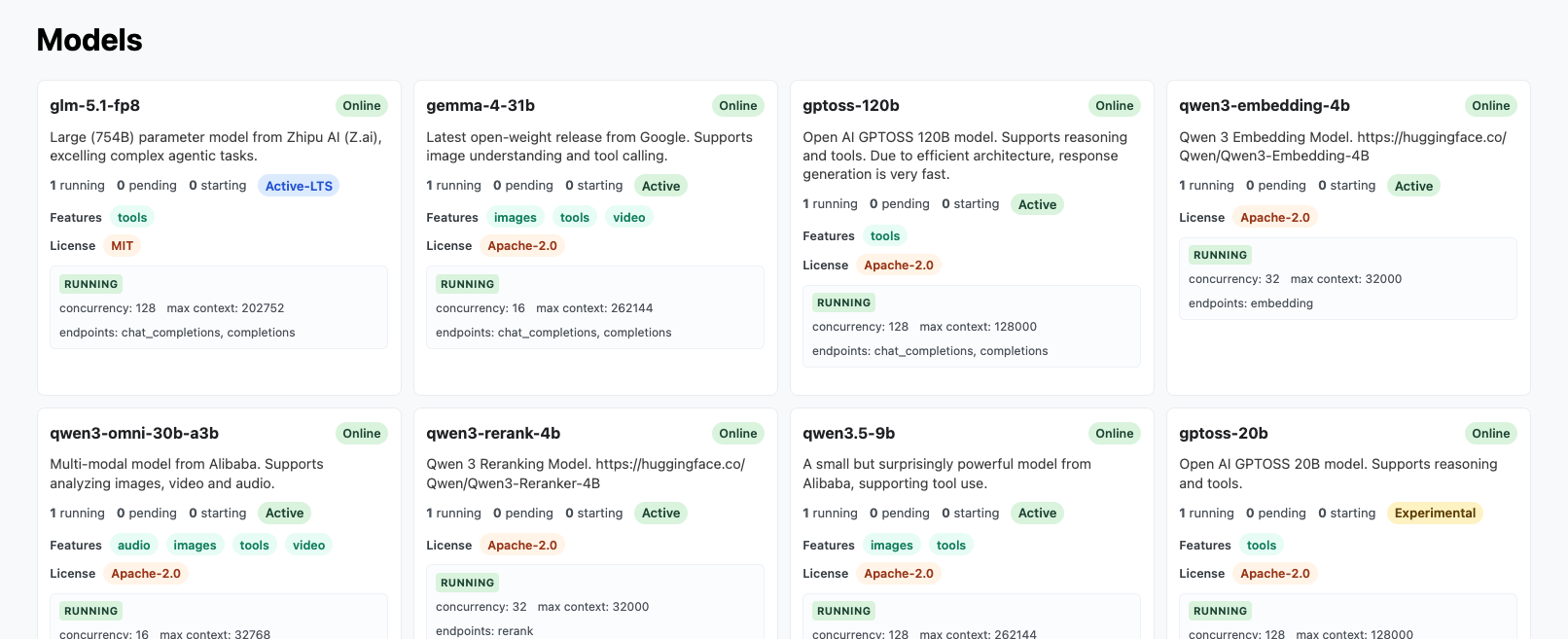
Before connecting a client, check the Models page in the service UI and copy the exact model name you want to use.
Model Lifecycle
While it is our intention to keep the service running and follow the lifecycle guidance below, the whole service is in Beta and we may need to adjust this guidance.
We have to balance a limited supply of compute to run inference on large language models across two competing goals:
- Provide access to the latest models and
- Allow access to models over long time horizons.
In support of this, we assign each model a lifecycle tier:
- Experimental: The model is still undergoing evaluation. The underlying
engine may be buggy and may be updated.
- Availability: The model may go offline from time to time, either for updates or due to lack of resources. The model may be removed without notice if deemed not worth supporting.
- Use cases: Use this if you want to test the latest models.
- Active: The model is considered stable. No engine updates are expected.
- Availability: The model is expected to be generally available until retirement. Before retirement, it will be moved to deprecated status for at least one week.
- Use cases: Use this if you want access to stable models.
- Active-LTS: Our long-term support models.
- Availability: The model is expected to be generally available until retirement. Before retirement, it will be moved to deprecated status for at least two weeks and will not be retired in the middle of a semester.
- Use cases: Use this if you want access to stable models, especially throughout a semester.
- Deprecated: The model is considered deprecated. The date of retirement
will be listed.
- Availability: The model is available for use until the retirement date. Emails will be sent to users reminding them of model retirement.
- Use cases: You can continue using this model, but it is not recommended for new uses.
- Retired: The model has been retired from active service and is no longer
kept running persistently.
- Availability: The model will be offline until requested. Once started, the model will generally remain online until idle.
- Use cases: Use this model to replicate research that used an Active or Active-LTS model.
Using the API to Check Local Model Availability
We support the /v1/models endpoint for locally hosted models, providing data
in a similar structure to OpenAI's models endpoint. You can query it with:
curl https://llm.rcd.clemson.edu/v1/models \
  -H "Authorization: Bearer $RCD_LLM_API_KEY"
Example Output from /v1/models
/v1/models{
"object": "list",
"data": [
{
"id": "gemma-4-31b",
"object": "model",
"created": 1776259082,
"owned_by": "rcd"
},
{
"id": "glm-5.1-fp8",
"object": "model",
"created": 1776259082,
"owned_by": "rcd"
},
{
"id": "qwen3-30b-a3b-instruct-fp8",
"object": "model",
"created": 1762525527,
"owned_by": "rcd"
},
{
"id": "qwen3-embedding-4b",
"object": "model",
"created": 1762525511,
"owned_by": "rcd"
}
]
}
We also support an extended version by passing the full=true query parameter.
This returns all models, including ones that may be offline, along with
additional metadata such as:
- Number of online instances
- Lifecycle
- Supported features and abilities
- Supported endpoints
You can query it using:
curl 'https://llm.rcd.clemson.edu/v1/models?full=true' \
  -H "Authorization: Bearer $RCD_LLM_API_KEY"
Example Output from /v1/models?full=true
/v1/models?full=true{
"object": "list",
"data": [
{
"id": "gemma-4-31b",
"object": "model",
"created": 1776179410,
"owned_by": "rcd",
"instances_running": 1,
"instances_pending": 0,
"instances_starting": 0,
"features": ["images", "tools", "video"],
"lifecycle": "active",
"license": "Apache-2.0",
"endpoints": ["chat_completions", "completions"]
},
{
"id": "gptoss-20b",
"object": "model",
"created": 1762526256,
"owned_by": "rcd",
"instances_running": 1,
"instances_pending": 0,
"instances_starting": 0,
"features": ["tools"],
"lifecycle": "experimental",
"license": "Apache-2.0",
"endpoints": ["chat_completions", "completions"]
},
{
"id": "qwen3-30b-a3b-instruct-fp8",
"object": "model",
"created": 1762526263,
"owned_by": "rcd",
"instances_running": 1,
"instances_pending": 0,
"instances_starting": 0,
"features": ["tools"],
"lifecycle": "deprecated",
"license": "Apache-2.0",
"retirement_date": "2026-06-30",
"endpoints": ["chat_completions", "completions"]
},
{
"id": "glm-5.1-fp8",
"object": "model",
"created": 1776179410,
"owned_by": "rcd",
"instances_running": 1,
"instances_pending": 0,
"instances_starting": 0,
"features": ["tools"],
"lifecycle": "active-lts",
"license": "MIT",
"endpoints": ["chat_completions", "completions"]
},
{
"id": "qwen3-omni-30b-a3b",
"object": "model",
"created": 1776179410,
"owned_by": "rcd",
"instances_running": 1,
"instances_pending": 0,
"instances_starting": 0,
"features": ["audio", "images", "tools", "video"],
"lifecycle": "active",
"license": "Apache-2.0",
"endpoints": ["chat_completions", "completions"]
},
{
"id": "qwen3-embedding-4b",
"object": "model",
"created": 1762526276,
"owned_by": "rcd",
"instances_running": 1,
"instances_pending": 0,
"instances_starting": 0,
"lifecycle": "active",
"license": "Apache-2.0",
"endpoints": ["embedding"]
}
]
}
Using A Model Name
When configuring your client, use the exact model name as shown on the Models page. For example:
- In a
curlrequest, set the"model"field to the exact name. - In the Python
openaipackage, pass the name to themodelparameter. - In Using Codex with Local RLS Models, set the
modelvalue in~/.codex/config.toml.
If the model list changes after you have configured your client, update the model name in your configuration to match the current listing.
For OpenAI-hosted models reached through the RLS OpenAI gateway, use model names from the gateway model list instead of the local RLS model names on this page.
Model Requests
If there is a particular model that would be useful to your research, please let us know!