OpenAI API Through RLS
The RCD LLM Service can proxy selected OpenAI API requests. This lets eligible users use OpenAI-hosted models with their normal RLS API key and RLS-managed OpenAI credits.
Prerequisites
Before using the OpenAI gateway, make sure you have:
- an approved RCD LLM Service allocation
- an active RLS API key from llm.rcd.clemson.edu
- access to the Clemson network, either on campus or through VPN
If your allocation expires or your RLS API key is revoked, OpenAI gateway access stops too.
Data Path
RLS receives your request, checks your allocation and available OpenAI credits, forwards eligible requests to OpenAI and records accounting metadata for the request.
RLS does not log prompts, request bodies, uploaded content or model outputs for this gateway. However, request content is sent to OpenAI so OpenAI can produce the response. Only use the OpenAI gateway for data that is allowed under Clemson policy, sponsor requirements, IRB requirements, data-use agreements and any other rules that apply to your work.
See Acceptable Use Guidelines for additional guidance.
Quick Start
Store your RLS API key in an environment variable:
export RCD_LLM_API_KEY="your-rls-api-key-here"
Then configure the OpenAI Python package with the RLS OpenAI gateway base URL:
pip install openai
import os
from openai import OpenAI

client = OpenAI(
    api_key=os.environ["RCD_LLM_API_KEY"],
    base_url="https://llm.rcd.clemson.edu/v1",
)

response = client.responses.create(
    model="<openai-model-name>",
    input="Summarize the benefits of using an API gateway in two sentences.",
)

print(response.output_text)
Replace <openai-model-name> with a model available through the gateway. You
can check the model list with:
curl https://llm.rcd.clemson.edu/v1/models \
  -H "Authorization: Bearer $RCD_LLM_API_KEY"
Or on the models UI with external models shown (they will be below the open weight models).
Using Codex
Codex can use OpenAI through RLS by configuring a custom provider. Create a
profile file at ~/.codex/rls-openai.config.toml:
model = "<openai-model-name>"
model_provider = "rls-openai"
web_search = "disabled"

[model_providers.rls-openai]
name = "OpenAI through RLS"
base_url = "https://llm.rcd.clemson.edu/v1"
wire_api = "responses"
env_key = "RCD_LLM_API_KEY"
stream_idle_timeout_ms = 600000
Then start Codex with that profile:
codex --profile rls-openai
The example disables Codex web search by default to keep usage predictable. Some advanced OpenAI features, such as web search or image generation through the Responses API, may be available only when RLS can price and account for the request. Treat those features as limited and check your usage afterward.
OpenAI Credits
OpenAI gateway usage is charged against RLS OpenAI credits. The exact credit amounts and your current balances are shown on the OpenAI Credits page.
The credit model works in this order:
- Your requests use your individual monthly OpenAI allocation first.
- After your individual allocation is used, eligible requests can use released credits from the shared OpenAI pool.
- Shared-pool credits are released gradually during the calendar month so the pool is not exhausted immediately at the start of the month.
- If you use a large amount of shared-pool credits in a month, further shared usage may slow down for the rest of that month.
- Monthly OpenAI credit accounting resets on the first day of each calendar month.
The OpenAI Credits page shows your individual allocation, shared-pool usage, released shared credits, high-usage status, recent OpenAI requests and recent denials.
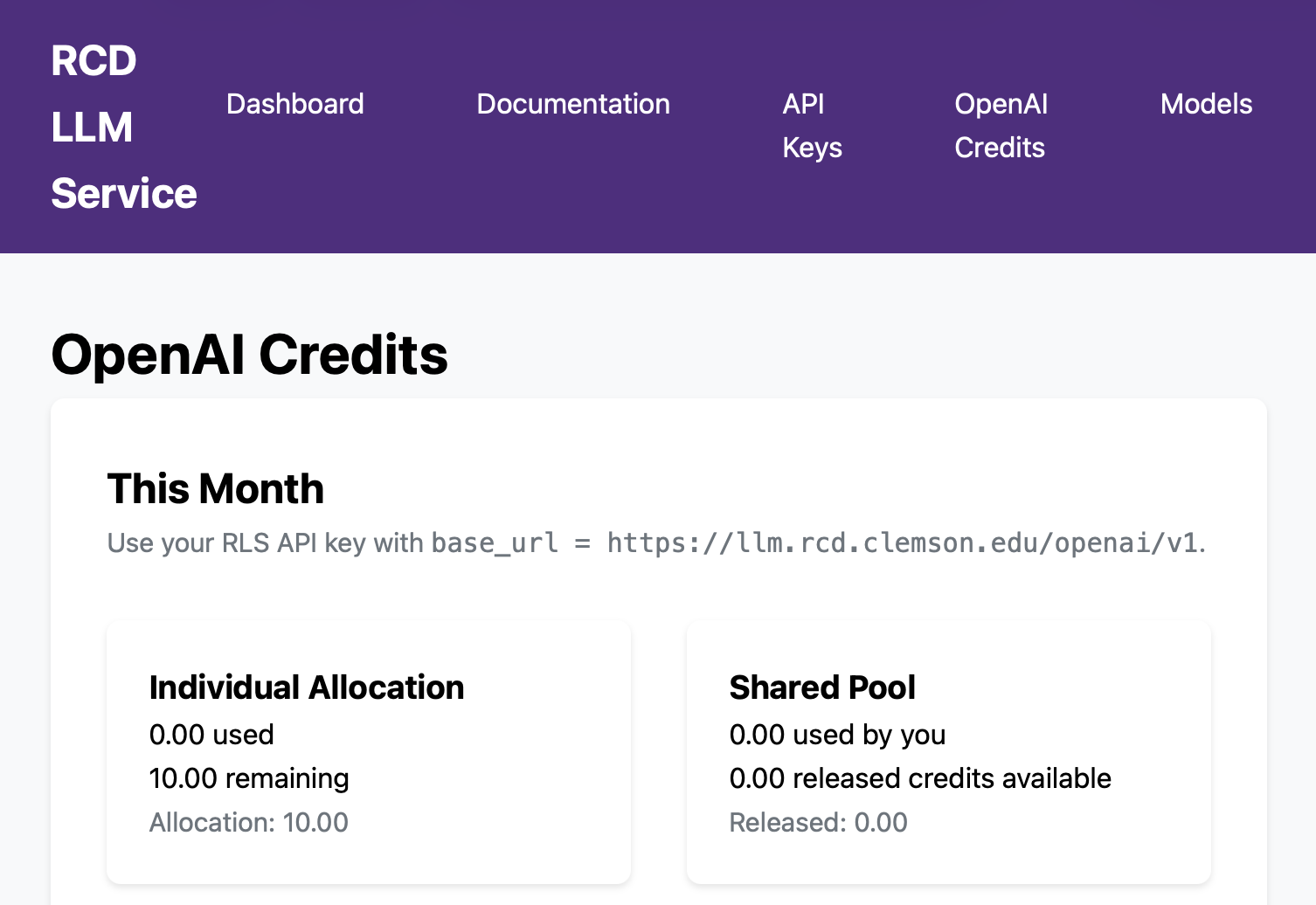
Values shown in documentation screenshots are examples. Check the live OpenAI Credits page for your current limits and remaining credits.
Supported API Features
RLS forwards only OpenAI requests that it can price and account for.
Supported through https://llm.rcd.clemson.edu/v1:
GET /modelsPOST /responsesPOST /chat/completionsPOST /embeddingsPOST /moderations
Not supported in the OpenAI gateway:
- file uploads and file inputs
- vector stores
- fine-tuning
- batches and evaluations
- assistants, threads and conversations
- realtime
- direct image, audio and video endpoints
- stored, background or delayed-cost workflows
Function tools are generally appropriate for tool-calling workflows. Hosted
OpenAI tools are limited. Features such as web_search and image_generation
through the Responses API should be treated as advanced behavior and may be
denied if RLS cannot account for the request.
Batch API
You can use the RCD LLM Service Batch API to submit batch
requests to OpenAI models as you would the open weight models. Since the
batching happens at our RCD LLM Service proxy level, you do not directly get the
OpenAI batch pricing by submitting to the Batch API. You can receive the
equivalent 50% discount, however, by submitting using the
flex service tier
in each of your batch requests.
Troubleshooting
If a request fails, check the OpenAI Credits page for recent denials and denial reasons.
Common causes include:
- no active RCD LLM Service allocation or inactive API key
- exhausted individual credits and no released shared credits available
- high shared-credit usage rate limiting
- unsupported endpoint, model, service tier, tool or input type
- a request that cannot be priced before being forwarded
- off-campus network access without the Clemson VPN