nf-core Pipelines
nf-core provides community-developed, reproducible bioinformatics workflows. The nf-core app on Open OnDemand provides a web form for launching supported pipeline versions on Palmetto 2 with Nextflow.
The dashboard groups available pipelines by workflow type and keeps multiple versions of a pipeline together, rather than displaying every version in the Interactive Apps menu.
Before You Start
Before launching a pipeline, identify the pipeline and version you need on the nf-core pipelines website. Read that pipeline's usage documentation to determine its required input files, sample-sheet format, reference data, and expected output.
Store input data, reference files, and results in a project directory on Palmetto 2. Do not use a temporary directory for pipeline results: workflow runs may take longer than an interactive session and temporary files can be removed. Use a new or empty output directory for each run unless you intend to resume a previous run.
Launching a Pipeline
-
Sign in to Open OnDemand.
-
Open Interactive Apps, then select nf-core pipelines.
-
Browse the workflow groups or use the search field to find a pipeline. Choose the required pipeline version to open its launch form.
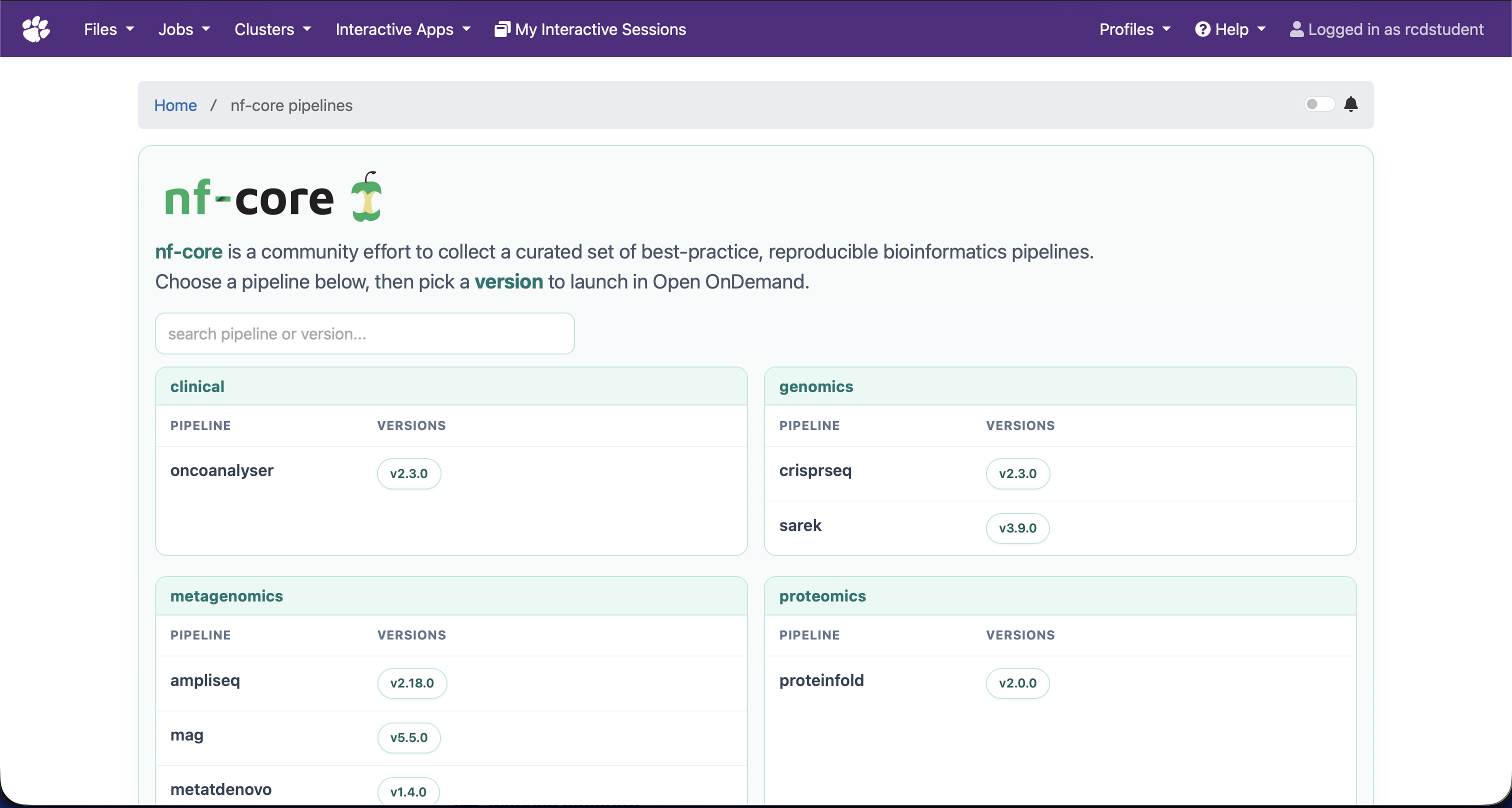
-
Complete the form. The exact options depend on the selected pipeline, but commonly include:
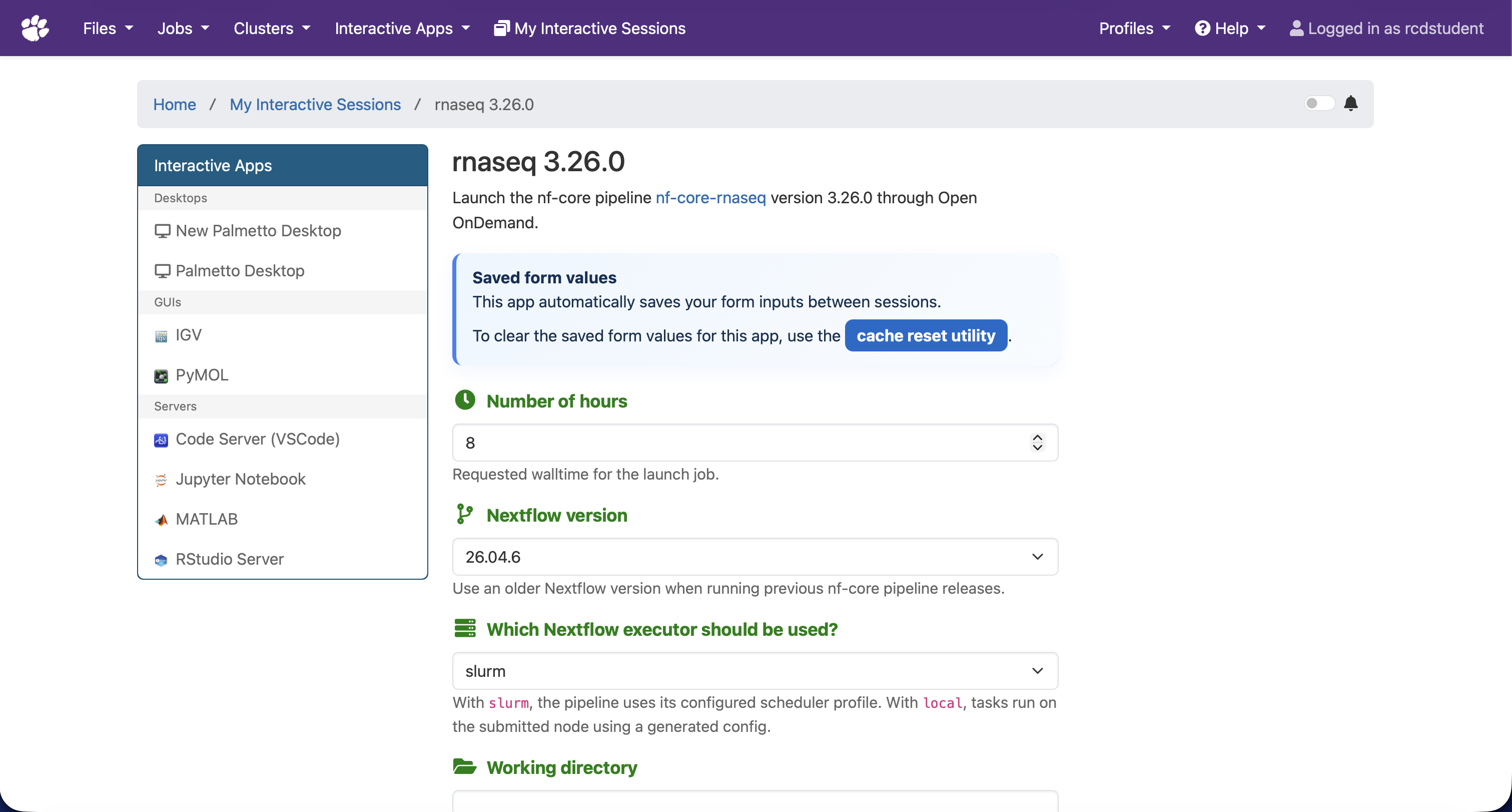
- The input sample sheet or input directory.
- An output directory, where the pipeline writes its results.
- A reference genome or other pipeline-specific reference files.
- Workflow options exposed by the nf-core pipeline.
- Nextflow version, partition, and wall time for the launch job.
Use absolute paths for files and directories. Required fields are marked in the form. Leave optional pipeline parameters at their documented defaults unless your analysis requires a change. The app saves form values between sessions; use the Cache Reset utility from the Open OnDemand Jobs menu to restore the form's default values.
-
Select the Slurm executor for normal production workflows. This submits the Nextflow launch job to Slurm and uses Palmetto's institutional nf-core configuration for site-specific scheduler settings. Nextflow then submits its individual workflow tasks as separate Slurm jobs. The local executor runs tasks on the single node assigned to the launch job and is best reserved for small tests.
-
Select Launch or Submit to start the workflow. The Open OnDemand session page shows the parent Nextflow job while it waits in the queue and starts.
Test a new pipeline configuration with a small data set before submitting a full analysis. This validates the sample sheet, input paths, references, and pipeline options without consuming a large allocation.
Monitoring and Results
An nf-core workflow has two levels of Slurm jobs:
- The Open OnDemand launch job runs Nextflow.
- Nextflow submits one or more child jobs for the workflow processes when using the Slurm executor.
The Open OnDemand session page primarily reports the parent job. To view every active workflow task, open Jobs > Active Jobs in Open OnDemand or run:
squeue --me
See monitoring Slurm jobs for additional command-line options.
When the workflow finishes, review the pipeline-specific result files and reports in the output directory specified on the form. If the pipeline produces a MultiQC report, open its HTML file from the output directory to review quality-control summaries.
Resuming a Run
The launch form includes a Resume previous run option. Select it only when rerunning the same pipeline in the same working directory after an interrupted or failed run. Nextflow can reuse completed work from its work directory, avoiding repeated computation.
Do not use resume after changing inputs, the pipeline version, or important pipeline parameters unless you understand how those changes affect Nextflow's cache. For a new analysis, choose a separate working and output directory.
Troubleshooting
- Verify that all input, reference, working, and output paths exist and are readable by you before submitting.
- Confirm that the selected pipeline version expects the sample-sheet format you supplied.
- If the launch job fails, inspect its Open OnDemand session output and the Nextflow log in the working directory.
- If child tasks remain pending, check their requested resources and queue
status with
squeue --me. - Keep the working directory after a failed run. It contains the Nextflow work cache needed to investigate the failure or resume the workflow.
Acknowledgements and Citation
The nf-core dashboard and the nf2ood utility that generates Open OnDemand pipeline apps were developed by Tufts Research Technology. Please cite the applicable PEARC publication when using either contribution:
-
Dashboard:
Yucheng Zhang and Jay McGlothlin. 2026. A Unified Open OnDemand Dashboard for Accessible nf-core Pipelines on HPC. Proceedings of the Practice and Experience in Advanced Research Computing 2026: Resilient Roots + Empowered Communities. Association for Computing Machinery, New York, NY, USA, Article 28, 1–4. https://doi.org/10.1145/3785462.3815827 -
nf2ood:
Yucheng Zhang, Payas Bhutra, and Xue Li. 2024. Nf-core on Open OnDemand: community-curated bioinformatics pipelines for everyone. In Practice and Experience in Advanced Research Computing 2024: Human Powered Computing (PEARC '24). Association for Computing Machinery, New York, NY, USA, Article 60, 1–5. https://doi.org/10.1145/3626203.3670559