Agent Skills on Palmetto
Agent Skills are reusable, file-based instructions that help AI coding assistants work more safely and accurately on Clemson's Palmetto cluster. RCD makes Palmetto skills available through Codex on Palmetto, and the same skills may also be reused by other skills-compatible agents.
Agent Skills do not replace the official RCD documentation. Instead, they tell the assistant when to consult Palmetto documentation, what evidence to inspect, which commands are low risk, and which actions require user approval.
On Palmetto, start Codex only inside a Slurm allocation on a compute node. Do not run Codex on the login nodes.
How Agent Skills Are Used
When Palmetto skills are available in your Codex session, Codex may choose a skill automatically based on your request. You can also name a skill explicitly in your prompt:
$palmetto-docs Explain this Slurm error and cite the relevant RCD docs.
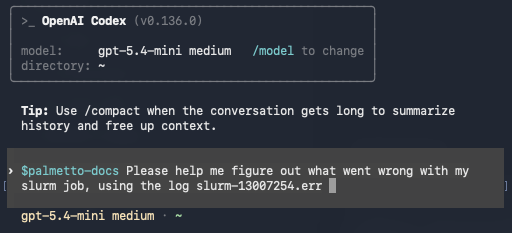
$palmetto-home-cleanup Help me understand what is filling my Palmetto home directory.
You can also ask in natural language:
My job failed with an out-of-memory error. Please review the script and output.
For best results, start Codex from the project directory that contains the files you want it to inspect. Paste or point it to the relevant job script, output file, error message, quota output, or other diagnostic evidence.
Available Palmetto Agent Skills
palmetto-docs
Use this skill when you want the assistant to answer Palmetto or Clemson RCD questions from verified documentation.
This skill is useful for questions about:
- Slurm jobs and scheduler output
- storage spaces and data transfer
- Open OnDemand
- ColdFront and allocations
- software modules and environments
- RCD LLM Service usage
- support and training resources
The skill tells the assistant to search bundled RCD documentation before making Clemson-specific claims. It also tells the assistant to distinguish documentation facts from live cluster state. For example, documentation can explain how to check a job or request a resource, but live command output is needed to know what is happening to your current job.
RCD also provides a
Palmetto HPC Helper custom GPT
for ChatGPT users. It is related to the palmetto-docs skill in purpose, but it
is not an Agent Skill and is separate from Codex on Palmetto.
Good prompts:
$palmetto-docs What does this Slurm error mean?
$palmetto-docs Review my batch script for Palmetto-specific issues before I submit it.
$palmetto-docs Summarize the RCD guidance for moving data into or out of Palmetto.
palmetto-home-cleanup
Use this skill when you need help understanding storage pressure in your Palmetto home directory.
This skill is best used as an assistant-guided cleanup workflow. The assistant
can help identify where large files or folders are, reason about what may be in
those files and folders, interpret quota or du output, and suggest cleanup
steps for you to review and run.
The skill is not intended for agent-directed cleanup. The assistant should not delete, move, purge, clean, remove environments, empty Trash, overwrite files, or change permissions as part of this skill.
For a full home-directory size scan, the skill may recommend a small Slurm diagnostic job that writes a report outside your home directory. Codex should explain what the job does and ask for your approval before submitting it.
Good prompts:
$palmetto-home-cleanup I pasted my checkquota output below. What should I inspect first?
$palmetto-home-cleanup Find likely cleanup candidates in my home directory, but do not delete anything.
$palmetto-home-cleanup I have a recent `du` report from /scratch. Please interpret it.
Tips For Effective Use
Ask for explanation before action. For example, ask Codex to explain a command, script, or error message before asking it to edit files or submit work.
Review approval prompts carefully. Palmetto skills are designed to ask before actions such as submitting jobs, cancelling jobs, starting large scans, changing permissions, installing software, starting transfers, or deleting data.
When in doubt, ask Codex to cite the RCD documentation it used. For Palmetto-specific commands, paths, policies, and service URLs, the assistant should be able to point back to documentation or clearly say that it needs live cluster output.